
Signs Your Network Closet Needs a Professional Cleanup
A well-organized network closet is essential for maintaining reliable business connectivity, protecting IT equipment, and making network maintenance easier. However, as businesses grow and technology evolves, network closets can quickly become cluttered with tangled cables, outdated hardware, poor labeling, and equipment that no longer serves a purpose.
What may begin as a manageable collection of switches, routers, patch panels, and network cables can eventually turn into a disorganized space that makes troubleshooting difficult and increases the risk of network disruptions.
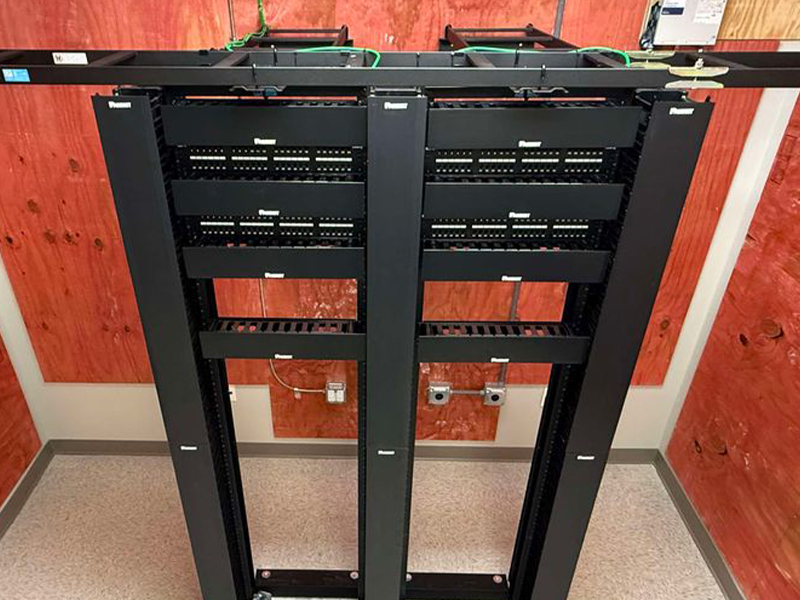
Recognizing the signs that your network closet needs professional attention can help your business avoid unnecessary downtime, improve equipment accessibility, and maintain a more reliable IT infrastructure.
Horizon Electronics provides professional network closet cleanup for your business, helping organizations improve cable management, organize network equipment, and maintain a cleaner, more manageable IT environment.
1. Tangled Network Cables Are Difficult to Trace
One of the most obvious signs that your network closet needs a cleanup is a mass of tangled Ethernet cables, patch cords, and other network connections.
When cables are bundled together without a clear organization system, identifying individual connections becomes challenging. If a network port stops working or a device loses connectivity, your IT team may spend valuable time tracing cables instead of resolving the problem.
Disorganized cabling can also make it easier to accidentally disconnect the wrong device during maintenance.
Professional cable management can help by:
- Routing cables into organized pathways.
- Separating connections where appropriate.
- Using cable management panels and supports.
- Removing unnecessary cable slack.
- Keeping connections accessible for future maintenance.
An organized cable layout makes it easier to identify connections, troubleshoot issues, and accommodate future network changes.
2. Your Network Equipment Is Overheating
Network switches, routers, firewalls, and other IT devices generate heat during normal operation. When equipment is crowded into a poorly organized closet, restricted airflow can contribute to excessive temperatures.
Dust buildup, blocked ventilation, improperly positioned equipment, and tangled cables can make the problem worse.
Overheating may cause equipment to operate unreliably, reduce performance, or shut down unexpectedly. In some cases, persistent heat can shorten the useful life of network hardware.
Look for warning signs such as unusually warm equipment, loud cooling fans, frequent temperature alerts, or devices that restart without an obvious explanation.
A professional cleanup can improve equipment accessibility and help identify airflow obstructions, accumulated dust, and other environmental concerns. Equipment ventilation requirements should always be followed, and any cooling problems should be addressed rather than simply rearranging cables.
3. You Cannot Identify Cables or Network Ports
Clear labeling is a fundamental part of effective network management. Unfortunately, cable labels often become outdated as businesses add devices, relocate workstations, or upgrade their infrastructure.
If your network closet contains unlabeled cables or labels that no longer match the connected equipment, routine maintenance can become unnecessarily complicated.
For example, an employee might report that a workstation cannot connect to the network. Without accurate labeling, identifying the correct switch port and tracing the connection could take significantly longer than necessary.
A professional network closet cleanup can include reviewing cable identification, improving labels, organizing patch panel connections, and documenting important network connections.
Accurate documentation makes it easier for IT personnel to identify equipment, complete troubleshooting tasks, and perform future upgrades with greater confidence.
4. Unused Cables and Outdated Equipment Are Taking Up Space
Businesses frequently upgrade their technology without completely removing the equipment and cabling that has been replaced.
Over time, this can leave network closets filled with disconnected patch cords, obsolete switches, unused power supplies, and equipment that no longer supports business operations.
Unnecessary equipment and cabling can obstruct access to active connections and make the entire space more difficult to manage.
During a professional cleanup, technicians can help identify abandoned cabling, determine which equipment remains in use, and organize the remaining infrastructure. Before removing any cable or device, its purpose should be verified to prevent accidental disconnection of an active service.
Retired equipment should also be handled according to your organization's data security, asset management, and electronic waste disposal requirements.
The goal is to create a cleaner, more functional environment without disrupting the network services your business depends on.
5. Network Problems Are Becoming More Difficult to Troubleshoot
Intermittent connectivity issues can be frustrating for employees and IT teams alike. Although disorganized cabling is not always the cause of network problems, a cluttered network closet can make identifying the underlying issue more difficult.
When connections are difficult to trace and equipment is poorly arranged, technicians may need additional time to inspect the infrastructure, verify connections, and isolate potential faults.
A properly organized network closet helps create a more predictable maintenance environment.
Technicians can more easily access switches, inspect patch panels, identify individual connections, and determine whether a problem may be related to cabling, hardware, or another part of the network.
Professional cleanup can also provide an opportunity to identify visibly damaged cables, unsecured equipment, or other conditions that warrant further investigation.
An organized closet does not eliminate every network problem, but it can make troubleshooting more efficient and help your business maintain its IT infrastructure.
6. Your Network Closet Has Poor Airflow or Excessive Dust
Network closets are often located in utility rooms, storage areas, or other spaces that receive little attention during routine office cleaning.
As dust accumulates, it can collect around equipment ventilation openings and contribute to cooling problems. Storage boxes, office supplies, and other materials may also obstruct airflow or limit access to network hardware.
These conditions can make an already crowded network closet more difficult to maintain.
A professional assessment can help identify clutter, ventilation obstructions, and visible dust accumulation that should be addressed. Cleaning around sensitive electronic equipment should be performed carefully using appropriate methods to avoid damaging components.
Businesses should also keep unrelated storage materials away from networking equipment and maintain suitable environmental conditions for their hardware.
A clean, accessible network closet supports better equipment maintenance and helps technicians identify potential environmental issues before they become more serious.
7. New Equipment Is Difficult to Install
As your business expands, your network infrastructure may need additional switches, access points, security devices, servers, or other equipment.
However, an overcrowded network closet can make upgrades more complicated. There may be insufficient rack space, limited access to power connections, poorly arranged patch panels, or no clear pathway for new cabling.
These challenges can increase installation complexity and make future maintenance more difficult.
A professional cleanup helps establish a more organized foundation for future growth. Technicians can review the existing layout, identify unnecessary clutter, and improve cable routing and equipment accessibility.
Although cleanup alone cannot create additional rack capacity or resolve every infrastructure limitation, it can help your organization make better use of the available space.
Planning for future equipment needs during a cleanup can also help prevent the same disorganization from returning after the next technology upgrade.
8. Your Network Closet Does Not Meet Your Business Needs
A network closet that worked well when your company had ten employees may not be suitable after expanding to multiple departments, additional locations, or more connected devices.
Business growth increases the demands placed on network infrastructure. More endpoints, wireless access points, security systems, and communication tools can create additional cabling and equipment management requirements.
If your network closet has become difficult to access, maintain, or expand, it may be time for a more comprehensive review.
A professional assessment can help determine whether the space needs better cable organization, clearer labeling, improved equipment placement, or additional infrastructure planning.
For organizations operating across multiple locations, consistent network closet organization can also support standardized maintenance practices and make it easier for IT teams to understand how each location is configured.
Why Professional Network Closet Cleanup Matters
Cleaning up a network closet involves more than making cables look neat. It requires understanding how network equipment connects, how cables should be managed, and how to organize the infrastructure without interrupting essential business operations.
Improperly disconnecting a cable, disturbing a fiber connection, or moving active equipment without a plan can create unexpected service interruptions.
Professional technicians can assess the existing environment, identify potential concerns, organize connections, and help establish a more maintainable layout.
The benefits may include:
- Improved cable management: Organized connections are easier to identify and maintain.
- Simplified troubleshooting: Clear labeling and accessible equipment can reduce the time required to trace connections.
- Better equipment accessibility: Technicians can work more efficiently when devices and connections are easy to reach.
- Support for future growth: A cleaner layout can make planned upgrades easier to manage.
- Improved maintenance practices: Organized infrastructure supports more consistent documentation and ongoing care.
The scope of a cleanup depends on your current infrastructure, the condition of your equipment, and your business requirements.
Trust Horizon Electronics for Professional Network Closet Cleanup
Your network closet plays an important role in supporting your organization's connectivity, communications, and daily operations. When cabling becomes tangled, equipment is difficult to access, or network connections are poorly documented, routine maintenance can become more complicated than it needs to be.
Horizon Electronics provides professional network closet cleanup for your business, helping organizations improve cable organization, equipment accessibility, and overall network infrastructure management.
Whether your business needs to organize an existing network closet, prepare for new equipment, or improve the maintainability of its cabling infrastructure, Horizon Electronics can help you take the next step toward a cleaner and more functional IT environment.
Don't wait until a disorganized network closet complicates your next network issue or equipment upgrade.
Contact Horizon Electronics to discuss your network closet cleanup needs and learn how professional cable management and organization can support your business.
If you would like a quote for an upcoming job,
please click the "Request Quote" button below.
Nationwide Coverage
