
When Is It Time to Upgrade from Cat5e to Cat6A?
Network infrastructure plays a critical role in how modern businesses operate. From cloud applications and video conferencing to wireless access points, security cameras, and data-intensive systems, organizations depend on reliable, high-speed connectivity throughout their facilities.
Many businesses still use Cat5e cabling, and in the right environment, it can continue to provide dependable performance. However, as network demands increase, Cat5e may no longer be the best long-term solution. Upgrading to Cat6A can provide additional bandwidth, improved performance, and greater flexibility for future technology needs.
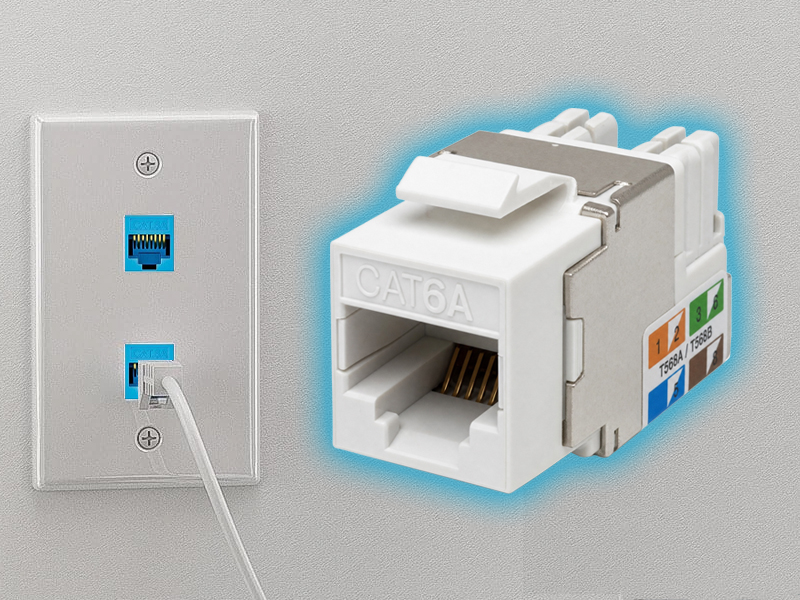
But when is the right time to make the change? Understanding the differences between these cable categories and recognizing the signs of an aging or undersized network can help businesses make a more informed decision.
What Is Cat5e Cabling?
Cat5e, or Category 5 enhanced, is a widely used twisted-pair Ethernet cable standard. It supports Gigabit Ethernet speeds of up to 1 Gbps over distances of up to 100 meters when installed within applicable specifications.
Cat5e is commonly found in:
- Office buildings
- Retail stores
- Schools
- Small commercial facilities
- VoIP phone systems
- Standard computer networks
- Point-of-sale systems
- Basic wireless access point installations
For businesses with moderate network requirements, a properly installed Cat5e system may still perform effectively. However, the fact that a cable is working does not necessarily mean it is prepared for future demands.
What Is Cat6A Cabling?
Cat6A, or Category 6 augmented, is designed for higher-performance network environments. It supports 10 Gigabit Ethernet over distances of up to 100 meters and offers bandwidth performance up to 500 MHz.
Cat6A also provides improved resistance to crosstalk compared with earlier cable categories, making it well suited for demanding commercial installations.
Cat6A is often considered for:
- High-performance office networks
- Data centers
- Healthcare facilities
- Warehouses and distribution centers
- Manufacturing environments
- High-density wireless networks
- Large commercial buildings
- Multi-location network deployments
Because network cabling can remain in place for many years, Cat6A is often selected when businesses want infrastructure that can support evolving technology requirements.
Cat5e vs. Cat6A: Key Differences
| Feature | Cat5e | Cat6A |
| Typical maximum Ethernet speed | 1 Gbps | Up to 10 Gbps |
| Maximum channel distance | Up to 100 meters | Up to 100 meters |
| Bandwidth | Up to 100 MHz | Up to 500 MHz |
| Crosstalk protection | Standard | Improved |
| Cable construction | Generally smaller and more flexible | Generally larger and requires more installation planning |
| Common applications | Standard business networks | High-performance and future-ready networks |
The best choice depends on the business's current infrastructure, equipment, performance requirements, and long-term plans.
Signs Your Business May Need a Cat6A Upgrade
There is no universal expiration date that automatically requires Cat5e to be replaced. Instead, businesses should evaluate how their network is performing and whether the infrastructure can support upcoming requirements.
Several signs may indicate that an upgrade is worth considering.
1. Your Network Requires Higher Speeds
If your business is moving toward multi-gigabit networking or 10 Gigabit Ethernet, Cat6A may be a better fit than existing Cat5e infrastructure.
Faster network equipment and internet services can provide significant benefits, but the cabling must also support the intended performance.
An infrastructure assessment can help determine whether current cabling is limiting network capabilities.
2. You're Upgrading to High-Performance WiFi
Modern wireless access points are capable of supporting increasingly high data rates and larger numbers of connected devices.
However, each access point depends on a wired network connection. If the cabling cannot support the required bandwidth, wireless performance may be limited.
Businesses upgrading to high-performance WiFi should evaluate whether their existing horizontal cabling is appropriate for the new wireless equipment.
3. Your Business Is Adding More Connected Devices
Modern businesses rely on a growing number of network-connected technologies, including:
- Computers and mobile devices
- Wireless scanners
- Security cameras
- VoIP systems
- IoT sensors
- Smart building systems
- Automated equipment
- Digital signage
- Cloud-based applications
As device density increases, network infrastructure must be able to support greater traffic and performance demands.
Cat6A may be appropriate for businesses preparing for a significant increase in connected devices.
4. You're Building or Renovating a Facility
New construction and major renovations provide an ideal opportunity to evaluate network cabling.
Once walls, ceilings, and finished spaces are complete, replacing cabling can become more disruptive and difficult.
If your business is already planning construction work, installing modern infrastructure during that process can help prepare the facility for future technology upgrades.
5. Your Network Cabling Is Difficult to Maintain
Aging infrastructure is not always identified by slow speeds alone. Disorganized or poorly documented cabling can also create operational challenges.
Warning signs may include:
- Unlabeled cables
- Outdated patch panels
- Tangled network closets
- Damaged cable jackets
- Improper terminations
- Frequent connectivity issues
- Unknown cable routes
A cabling upgrade provides an opportunity to improve organization, labeling, cable management, and documentation.
6. You're Planning for Long-Term Growth
Network cabling is often expected to remain in service for many years. Businesses should consider whether their infrastructure will support future requirements rather than focusing only on current needs.
Cat6A may be a strong option for organizations planning:
- Office expansions
- Warehouse automation
- Higher-performance WiFi
- Additional security systems
- Increased cloud usage
- Data-intensive applications
- New locations
- Technology modernization
Installing scalable infrastructure can help reduce the need for another major cabling project later.
Is Cat6A Always Necessary?
Not every business needs to replace Cat5e with Cat6A.
If your current network supports your applications, equipment, and performance requirements without issues, an immediate upgrade may not be necessary.
Cat5e can remain a practical solution for many standard Gigabit Ethernet applications. The decision should be based on the business's actual needs, planned technology investments, and the condition of the existing infrastructure.
A professional assessment can help determine whether replacing all cabling is necessary or whether a targeted upgrade would be more appropriate.
Consider the Installation Environment
Cat6A cables are generally larger than Cat5e cables and may require additional planning for routing, bend radius, cable pathways, and termination.
Commercial installations should account for:
- Existing conduit and cable trays
- Telecommunications room space
- Rack and patch panel capacity
- Cable pathway congestion
- Ceiling access
- Separation from electrical systems
- Future cable expansion
Proper installation is essential to achieving the performance expected from Cat6A infrastructure.
Test and Certify the New Installation
After a cabling upgrade, professional testing and certification help verify that the installation meets the required performance standards.
Testing can identify:
- Wiring errors
- Poor terminations
- Damaged cables
- Signal performance issues
- Connectivity problems
Certification documentation also gives IT teams a reliable record of the completed installation and can simplify future maintenance.
Why Businesses Choose Horizon Electronics
Upgrading network infrastructure requires careful planning and an understanding of how a business uses technology. Horizon Electronics can upgrade your network to Cat6A, helping businesses improve their network infrastructure and prepare for future performance requirements.
Horizon Electronics evaluates existing cabling, network equipment, facility layouts, and technology needs to determine the most appropriate solution. Depending on the project, an upgrade may include Cat6A installation, fiber optic cabling, network closet improvements, patch panel replacement, cable management, testing, and certification.
Horizon Electronics provides commercial structured cabling services for offices, warehouses, manufacturing facilities, retail locations, healthcare organizations, schools, hotels, distribution centers, and multi-location businesses.
Whether your business is replacing aging cabling, upgrading wireless infrastructure, renovating a facility, or preparing for higher network speeds, Horizon Electronics can help design and install a reliable network solution tailored to your needs.
Conclusion
Upgrading from Cat5e to Cat6A is not simply about replacing an older cable with a newer one. It is about evaluating whether your network infrastructure can support your business's current technology and future growth.
Businesses should consider an upgrade when they need higher network speeds, are deploying high-performance WiFi, adding connected devices, renovating facilities, experiencing cabling limitations, or planning long-term technology expansion.
Cat5e remains suitable for many standard network applications, but Cat6A offers greater bandwidth and support for 10 Gigabit Ethernet over standard commercial channel distances.
If you're unsure whether your business is ready for an upgrade, a professional cabling assessment can help identify your options. Horizon Electronics can upgrade your network to Cat6A and provide the structured cabling expertise needed to build a reliable, scalable infrastructure for your business.
If you would like a quote for an upcoming job,
please click the "Request Quote" button below.
Nationwide Coverage
