
Common WiFi Challenges in Large Warehouses and How to Solve Them
Reliable WiFi is essential for modern warehouse operations. From barcode scanners and inventory management systems to mobile workstations, connected equipment, and shipping applications, many warehouse processes depend on consistent wireless connectivity.
However, providing reliable WiFi in a large warehouse can be challenging. High ceilings, metal shelving, dense inventory, moving equipment, and expansive floor plans can interfere with wireless signals and create coverage gaps.
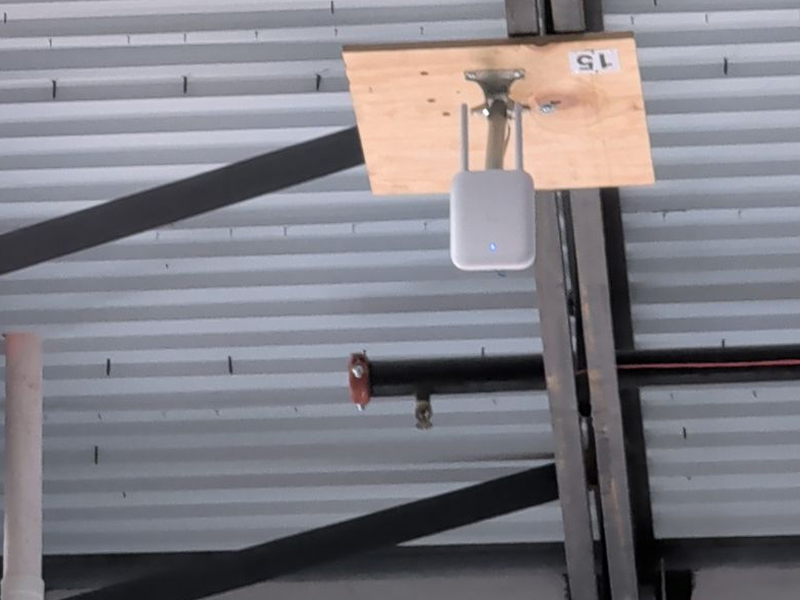
When warehouse WiFi is unreliable, employees may experience delayed inventory updates, disconnected scanners, slow applications, and interruptions to daily operations. A properly designed wireless network can help businesses minimize these problems and maintain efficient workflows.
Understanding the most common warehouse WiFi challenges is the first step toward building a network that supports productivity, accuracy, and future growth.
Why Is Warehouse WiFi Different from Office WiFi?
Warehouses have unique physical layouts and operational requirements that make wireless network planning more complex than a typical office installation.
An office may have relatively open spaces, standard ceiling heights, and predictable device locations. A warehouse, by comparison, may contain hundreds of feet of shelving, tall racks filled with inventory, concrete walls, loading docks, and equipment that moves throughout the facility.
Warehouses may also depend on continuous connectivity for handheld scanners, mobile computers, voice-directed picking systems, wireless printers, and inventory tracking applications.
A successful warehouse WiFi installation must account for the building's physical environment, the number and types of connected devices, and the operational demands of the business.
Challenge 1: Poor WiFi Coverage Across Large Spaces
One of the most common warehouse WiFi problems is inconsistent coverage. A wireless network that performs well near the front office may provide weak signals in distant aisles, storage areas, or loading docks.
Large buildings often require multiple wireless access points strategically positioned to provide adequate coverage throughout the facility.
How to solve it:
Start with a professional wireless site survey. This assessment evaluates the building layout, existing wireless signals, potential interference, and areas where coverage may be insufficient.
Based on the findings, a network designer can determine the appropriate number and placement of access points. The goal is to provide reliable coverage throughout the areas where employees and equipment need connectivity, rather than simply installing more access points without a plan.
Challenge 2: Metal Shelving and Inventory Blocking Signals
Metal shelving, storage racks, machinery, and dense inventory can weaken or obstruct WiFi signals. The problem may become more noticeable when warehouse shelves are fully stocked or when inventory arrangements change.
Wireless coverage can also vary depending on the height and density of stored materials.
How to solve it:
Access point placement should reflect the actual warehouse layout, including rack configurations, aisle widths, and storage heights.
In some facilities, access points may need to be positioned to provide coverage along specific aisles or work areas. Directional antennas may also be appropriate for certain environments.
Testing the wireless network under realistic operating conditions helps reveal coverage problems that might not appear in an empty building.
Challenge 3: WiFi Dead Zones and Dropped Connections
Dead zones occur when wireless signals are too weak or unreliable to support consistent connectivity. These areas can cause scanners to disconnect, applications to freeze, or workers to lose access to inventory information.
Dead zones may appear in corners of a building, behind large racks, near loading areas, or between different coverage zones.
How to solve it:
A professional WiFi assessment can identify dead zones and determine their causes. Solutions may include repositioning access points, adding access points, adjusting antenna configurations, or improving the wireless network design.
Roaming behavior should also be evaluated. Mobile devices need to transition appropriately between access points as employees move through the warehouse.
The objective is to maintain dependable connectivity as workers travel between receiving, storage, picking, packing, and shipping areas.
Challenge 4: Too Many Connected Devices
Large warehouses can have hundreds or thousands of connected devices, depending on their size and operations. These may include scanners, tablets, mobile computers, printers, cameras, and employee devices.
When too many devices compete for limited wireless capacity, performance may decline even when the signal appears strong.
How to solve it:
Network planning should account for device density, application requirements, and peak operating periods.
Modern access points can support more demanding wireless environments, but their capacity depends on the specific hardware, configuration, interference levels, and connected devices.
Network administrators should also evaluate channel assignments, radio settings, and network segmentation where appropriate. Monitoring performance during busy shifts can help identify congestion before it disrupts operations.
Challenge 5: Interference from Other Equipment
WiFi operates on radio frequencies that can be affected by other wireless networks and certain electronic equipment. Neighboring businesses, wireless devices, and poorly planned access point configurations may contribute to interference.
In warehouses, interference can be especially difficult to diagnose because the source may not be obvious.
How to solve it:
A wireless site survey can identify competing networks, channel congestion, and potential sources of interference.
Proper channel planning and radio configuration can reduce unnecessary interference. Depending on device compatibility and network requirements, the 5 GHz and 6 GHz bands may offer useful alternatives to the more congested 2.4 GHz band.
However, higher-frequency signals generally have less ability to penetrate obstacles, so band selection must account for the warehouse layout and coverage requirements.
Challenge 6: Slow Network Performance During Peak Hours
Some warehouses experience reliable WiFi during quieter periods but encounter slowdowns when order processing, inventory scanning, and shipping activity increase.
This may indicate insufficient wireless capacity, network congestion, limitations in the wired network, or application and server performance problems.
How to solve it:
Evaluate network performance during actual operating hours, especially during peak shifts.
IT teams should review access point utilization, connected device counts, channel congestion, switch capacity, internet connectivity, and application response times.
A strong WiFi signal does not necessarily mean the entire network is performing properly. Troubleshooting should examine both the wireless connection and the wired infrastructure supporting it.
Challenge 7: An Inadequate Cabling Infrastructure
Wireless access points still depend on a reliable underlying network. Many commercial access points connect to switches through Ethernet cabling and receive power through Power over Ethernet (PoE).
If the cabling is damaged, improperly terminated, outdated, or unable to meet the installation's requirements, the wireless network may not perform as expected.
How to solve it:
Review the existing structured cabling before installing or upgrading warehouse WiFi.
Depending on the network design, a facility may need new Ethernet cable runs, additional network switches, fiber optic connections between network rooms, or cable certification testing.
Planning the wired infrastructure alongside the wireless design helps ensure that access points have the connectivity and power they need.
Challenge 8: Limited Scalability for Future Growth
Warehouse operations change over time. Businesses may add storage racks, expand their facilities, introduce new inventory systems, or increase the number of connected devices.
A WiFi network designed only for current needs may struggle as operations expand.
How to solve it:
Plan for future capacity when designing the wireless network. Consider anticipated device growth, building expansions, new applications, and changes to warehouse workflows.
A scalable design may include sufficient network switching capacity, structured cabling pathways, fiber backbone connections, and room for additional access points.
Documenting access point locations, cabling routes, and network configurations also makes future upgrades easier to manage.
Why Professional Warehouse WiFi Installation Matters
Reliable warehouse WiFi requires more than mounting access points and connecting them to the network. It involves understanding the facility, assessing radio frequency conditions, planning access point placement, evaluating cabling, and testing performance.
Professional installation can help identify potential problems before they affect daily operations.
For businesses operating large warehouses or multiple distribution centers, consistent network planning can also simplify maintenance and support future expansion.
Horizon Electronics Installs WiFi in Large Warehouses
Horizon Electronics installs WiFi in large warehouses, helping businesses establish wireless connectivity that supports demanding commercial operations.
From warehouse WiFi installation and structured cabling to fiber optic infrastructure and network connectivity, Horizon Electronics can help businesses plan the physical network infrastructure needed to support their facilities.
Whether you are experiencing wireless dead zones, unreliable barcode scanners, slow inventory applications, or planning WiFi for a new distribution center, evaluating the entire network environment is an important first step.
A well-planned installation considers the warehouse layout, shelving, connected devices, wired infrastructure, and anticipated growth to help provide dependable connectivity throughout the facility.
Build a More Reliable Warehouse WiFi Network
Warehouse WiFi challenges can affect productivity, inventory accuracy, order fulfillment, and daily operations. Poor coverage, interference, device congestion, and inadequate cabling can all contribute to unreliable connectivity.
The most effective solution begins with understanding the facility's specific requirements. A professional site survey, carefully planned access point placement, reliable structured cabling, and performance testing can help address existing problems and prepare the network for future demands.
For businesses that depend on connected warehouse operations, investing in properly planned WiFi infrastructure can help create a more reliable foundation for productivity and growth.
If you would like a quote for an upcoming job,
please click the "Request Quote" button below.
Nationwide Coverage
